Adding to the tasks repository
Contents
- How do I access the OxCIN Open Tasks repository?
- What software package should I use?
- Where can I get advice on running experiments online?
- Sharing PsychoPy/Pavlovia tasks
- How do I add my task to the Open OxCIN Tasks repository(s)?
- Who can I get further advice?
How do I access the OxCIN Open Tasks repository?
Access the Open Tasks repository via the OxCIN Open Science GitLab group. To contribute a task to this repository, you will need to be added as a member - please contact the open OxCIN team at open@oxcin.ox.ac.uk to request permission.
What software package should I use?
If you’re starting out with developing a new task, we recommend using PsychoPy. There are several advantages to PsychoPy over other potential platforms. It contains both a builder mode (for people want to use a GUI to build their experiment) and a coder mode (for people who want to be as flexible as possible) - and the builder automatically creates usable Python code that you can edit in coder mode, which is a great way to learn. It has good, reliable timing, that has been tested across platforms. It can run experiments online or in the lab, and has its own server (Pavlovia) where you can easily collect behavioural data online. And it has excellent documentation and a large and growing userbase.
Of course, there are several other options out there for designing your task, including Psychtoolbox, Presentation, Gorilla, and Unity. If you develop your task using one of these platforms, you are still very welcome to share your task via the OxCIN Open Tasks repository!
Where can I get advice on running experiments online?
We recommend looking at this Introduction to Online Experiments, developed by the Brain and Cognition lab. These are strongly tailored towards people who are based at the University of Oxford and trying to develop their tasks, and includes guidance on programming your study, hosting it, recruiting participants, collecting data and obtaining ethical approval.
Sharing PsychoPy/Pavlovia tasks
We think the Pavlovia system for task sharing is a great infrastructure for maintaining up-to-date versions of your tasks, and sharing them with the rest of the world. As you may be aware, the back-end of the Pavlovia system is managed by GitLab, which can be accessed here. At OxCIN, we have a group called OPEN_OxCIN where we are gathering together projects that people are working on within Pavlovia. To contribute a task to this repository, you will need to be added as a member - please contact Laurence Hunt or Dejan Draschkow to request permission.
How do I add my task to the Open OxCIN Tasks repository(s)?
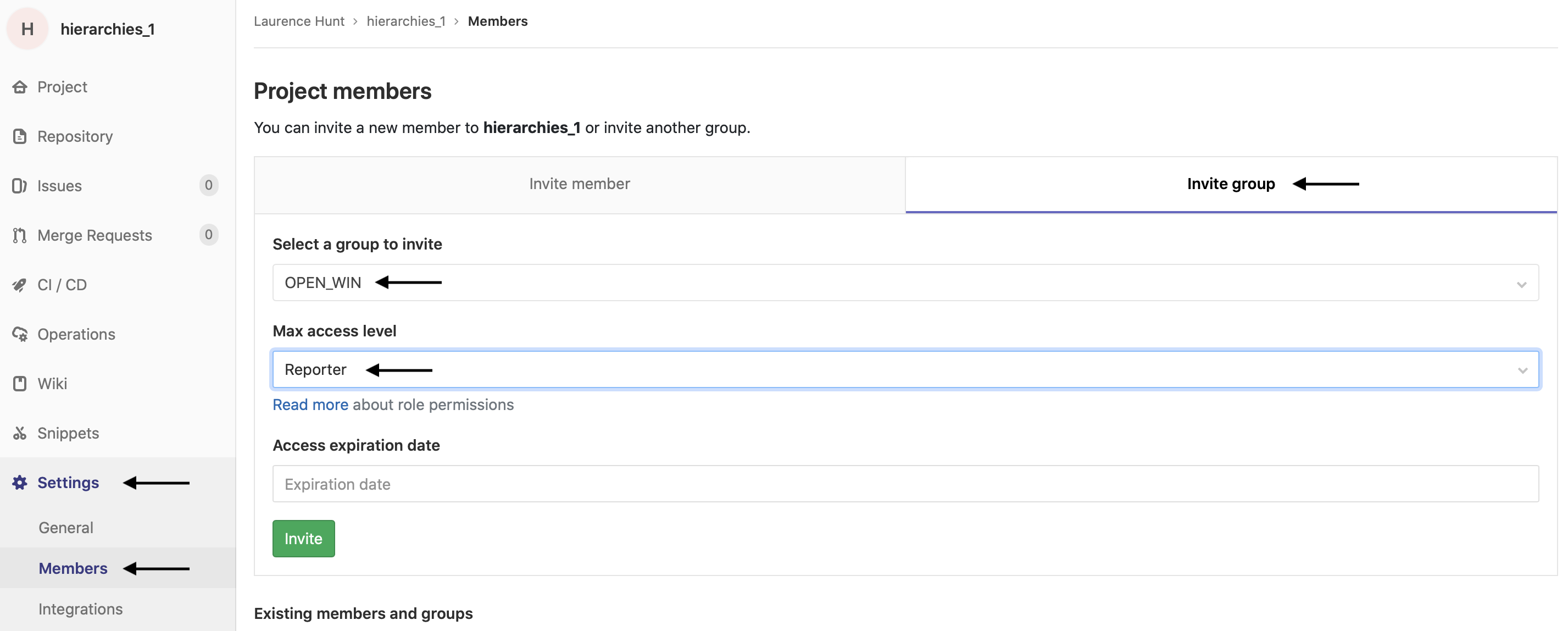
Once you’ve been added as a member of the OxCIN Open Tasks reposistory and/or the OPEN_OxCIN Pavlovia repository (see above), you can add your repositories to these groups! In OxCIN GitLab, go to your repository, and then click on “Members”, then “Invite Group”, and choose “open-science” in your group to invite. In PsychoPy, go to Pavlovia GitLab, and then click on “Settings”, “Members”, “Invite Group”, and choose “OPEN_OxCIN” as the group. We recommend that you add the repository to the group with ‘reporter’ permissions. See below for an example of how to do this:
Who can I get further advice?
In first instance, feel free to email the open OxCIN team at open@oxcin.ox.ac.uk for any further information you need.